Creative Insight Keynote Template: A Strategic Framework for Visual Communication
Effective presentation design is rarely about decoration; it is about reducing cognitive load and accelerating decision-making. The Creative Insight Keynote Template serves as a comprehensive visual infrastructure for professionals who need to convey complex ideas with clarity and speed. With 150 total slides organized across five distinct premade color variations, this asset functions less like a simple slide deck and more like a modular design system. For entrepreneurs, marketers, educators, and business leaders, the strategic value lies not merely in the aesthetic appeal but in the template’s ability to standardize high-quality visual communication without requiring extensive graphic design resources.
When approaching a project of this scale, it is essential to view the 30 slides per color variation as a curated library of communication patterns rather than a linear narrative. Each variation offers a unique psychological tone, allowing users to align their visual identity with specific stakeholder expectations or brand guidelines. By leveraging these pre-structured layouts, professionals can shift their focus from pixel-pushing to strategic storytelling, ensuring that the time invested in presentation development yields tangible returns in audience engagement and comprehension.
Aligning Visual Assets with Strategic Objectives
The primary risk in adopting any comprehensive template is using it indiscriminately. A deck with 150 slides can easily become bloated if every available layout is utilized simply because it exists. Strategic use of the Creative Insight Keynote Template requires an initial audit of your communication goals before opening the software. Are you presenting quarterly financial data to investors, pitching a creative concept to clients, or facilitating an internal workshop? Each scenario demands a different subset of the available assets.
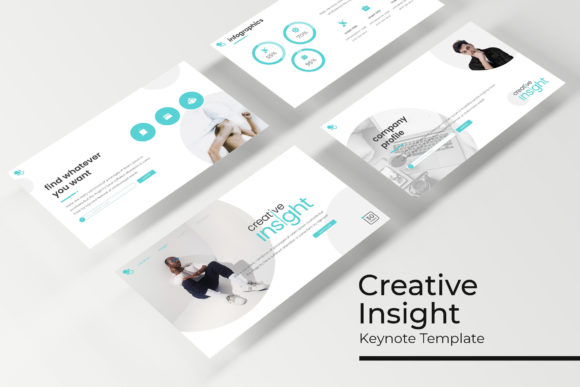
For data-heavy presentations, the handcrafted infographic section becomes the critical operational tool. These are not generic charts but structured visual arguments designed to highlight trends, comparisons, and hierarchies. When planning your narrative, identify the three to five key insights that must be retained by the audience. Select only those infographic slides that directly support these insights. The remaining slides should serve as connective tissue—section breaks, portfolio galleries, and typography-focused slides that provide breathing room and maintain pacing.
This selective approach prevents "template fatigue," where the audience becomes desensitized to repetitive visual motifs. By treating the five color variations as distinct thematic chapters or separate deliverables, you preserve the novelty and impact of the design. For agencies or consultants managing multiple clients, this modularity allows for rapid customization while maintaining a consistent standard of quality across different accounts.
Leveraging Master Slides for Operational Efficiency
Productivity in presentation design is often bottlenecked by inconsistent formatting. The Creative Insight Keynote Template addresses this through its master slide architecture. Understanding and utilizing master slides is the difference between a polished, professional deliverable and a disjointed collection of graphics. Because the resizable and editable graphic picture placeholders are anchored to master layouts, global changes can be applied instantly across dozens of slides.
This feature is particularly valuable for teams or organizations that require brand compliance. If a logo needs updating or a specific font weight must be adjusted for accessibility, doing so at the master level ensures uniformity without manual intervention on individual slides. For freelancers and small business owners operating with limited bandwidth, this efficiency translates directly to billable hours saved or faster turnaround times. The drag-and-drop functionality further streamlines the workflow, allowing non-designers to populate layouts with content confidently, knowing that the underlying grid and alignment remain intact.
However, efficiency should not come at the cost of intentionality. While the placeholder system makes it easy to insert images, each visual choice must support the narrative. The pixel-perfect illustrations included in the template provide a high baseline of quality, but they must be contextualized. A beautiful illustration that does not clarify a point or evoke the intended emotion is merely noise. Use the editable nature of these graphics to tweak colors, crop focuses, or adjust compositions so they feel bespoke to your specific message rather than stock assets pulled from a library.
Technical Considerations and Asset Management
Before integrating the Creative Insight Keynote Template into your production workflow, several technical factors warrant attention to ensure long-term usability. The package includes five KEY files in widescreen format, which is the current industry standard for both digital displays and modern projection systems. Verifying that your display environment supports 16:9 aspect ratios is a necessary first step to avoid letterboxing or distortion during live presentations.
Typography plays a foundational role in the template’s versatility. The inclusion of free font download links in the Readme file is a significant advantage, eliminating licensing ambiguities and ensuring that the design renders correctly across different machines. It is advisable to install these fonts immediately upon acquiring the template and to embed them or package them with your final presentation file if sharing with others. Font substitution is one of the most common causes of layout breakage in collaborative environments; proactive management of this dependency preserves the integrity of the pixel-perfect illustrations and text hierarchy.
Users must also navigate the distinction between included assets and preview materials. All photographs used in the promotional previews are for illustration purposes only and are not part of the deliverable. This is a standard practice that protects intellectual property rights, but it requires users to have their own image sourcing strategy. Relying on low-resolution or stylistically mismatched stock photography can undermine the premium feel of the template. Budgeting time and resources for high-quality, relevant imagery is as important as selecting the right slide layouts. The picture placeholders are designed to accommodate various aspect ratios, but the visual weight of your chosen images will dictate the overall balance of the composition.
Mitigating Risks Through Contextual Adaptation
A sophisticated template can inadvertently create a false sense of completion. The danger lies in assuming that filling in the text boxes constitutes a finished strategy. The Creative Insight Keynote Template provides the container, not the content. Without rigorous preparation and clear messaging, even the most beautifully designed slide will fail to persuade. Professionals must resist the urge to let the available layouts dictate the story structure. Instead, outline your argument independently, then map it to the template’s resources.
Another consideration is audience familiarity. In niche industries where specific templates are widely used, there is a possibility of recognition. To mitigate this, leverage the five color variations and editable graphics to create sufficient differentiation. Adjusting the color palette beyond the premade options, modifying illustration styles, or combining elements from different sections can help establish a unique visual signature. The goal is to use the template as a foundation for original expression, not as a uniform that identifies you as a user of a specific product.
Furthermore, consider the accessibility of your final output. While the template is designed with professional aesthetics in mind, users are responsible for ensuring sufficient contrast ratios, readable font sizes, and alt-text for screen readers when distributing digital versions. The handcrafted infographics, while visually striking, may require supplementary verbal explanation or simplified alternatives for audiences with visual impairments. Responsible use of design tools includes verifying that the pursuit of beauty does not exclude segments of your intended audience.
Maximizing Long-Term Value and ROI
To extract maximum return from the Creative Insight Keynote Template, treat it as a living asset rather than a disposable project file. Over time, you can develop a personalized subset of slides that have proven effective for your specific communication needs. Save these as a custom theme or starter deck to accelerate future projects. Document which color variations resonate best with different client demographics or internal departments. This institutional knowledge transforms a static purchase into a dynamic component of your operational playbook.
For educators and trainers, the section break slides and gallery layouts offer opportunities to create interactive learning modules. The consistent visual language helps students navigate complex curricula, while the variety within the 150-slide library prevents monotony over long courses. For marketers, the portfolio and infographic slides provide a reusable framework for case studies and performance reports, reducing the friction associated with regular reporting cycles.
Ultimately, the strategic utility of this template is defined by the discipline of its user. It offers a robust set of tools for visual problem-solving, but the solutions must originate from a deep understanding of your objectives and audience. By approaching the Creative Insight Keynote Template with intentionality, respecting its technical requirements, and adapting its assets to serve genuine communication needs, professionals can elevate their presentations from mere information delivery to impactful strategic instruments. The 150 slides are not a checklist to be completed, but a vocabulary to be spoken fluently in service of better decisions and clearer understanding.