Evaluating Coffees Keynote Template for Professional Presentations
Selecting the right presentation framework is a critical step in visual communication. For professionals and creatives working within the Apple ecosystem, the Coffees Keynote Template offers a structured solution designed specifically for coffee-related topics, hospitality businesses, and artisanal product showcases. This template provides a comprehensive library of assets intended to streamline the design process while maintaining a cohesive aesthetic. When evaluating this resource, it is essential to look beyond the preview images and understand the functional architecture, customization capabilities, and practical limitations inherent in the package.
Understanding the Scope and Structure
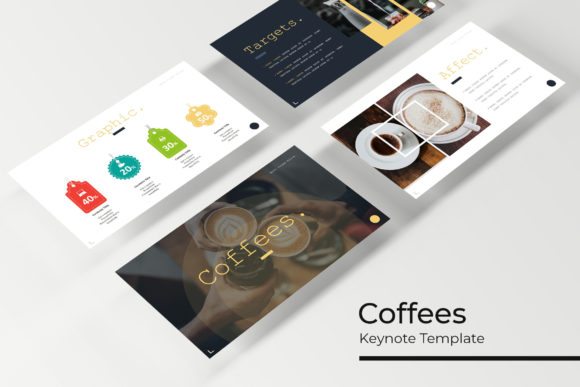
The primary value proposition of the Coffees Keynote Template lies in its volume and organizational structure. The package includes 150 total slides, which distinguishes it from smaller, more limited templates. Rather than offering a single monolithic design, the content is divided into five distinct premade color variations. Each color theme contains 30 unique slides, allowing users to select a specific palette that aligns with their brand identity or to mix elements across themes if desired.
This modular approach supports various presentation lengths and formats. Users are not forced to use every slide; instead, they can curate a deck from a larger pool of options. The inclusion of five separate KEY files means that each color variation is isolated, reducing file bloat and making it easier to manage specific projects without navigating through hundreds of unused layouts. Additionally, the template supports widescreen formats, ensuring compatibility with modern display standards and projection equipment commonly used in contemporary conference rooms and digital signage.
Design Assets and Customization Capabilities
For evaluators assessing the long-term utility of this template, the quality of editable assets is paramount. The Coffees Keynote Template emphasizes handcrafted infographics and pixel-perfect illustrations. Unlike generic stock vectors, these graphics are designed to integrate seamlessly with the slide masters. This integration allows for resizing and editing without significant loss of fidelity or alignment issues, which is a common pain point when modifying complex presentation templates.
The template utilizes master slides extensively. This technical foundation ensures global consistency; changing a font style or logo placement on a master slide propagates the update across all associated layouts. For users who need to adapt the template for different clients or seasonal campaigns, this feature significantly reduces repetitive manual work. Picture placeholders are configured for drag-and-drop functionality, streamlining the process of swapping preview images with actual content. However, users should note that the ease of this workflow depends heavily on adherence to the master slide structure. Deviating too far from the established grid may require manual realignment.
Strategic Fit: When This Template Adds Value
Determining whether the Coffees Keynote Template aligns with specific project goals requires an honest assessment of the subject matter. This template is engineered with a warm, organic, and artisanal aesthetic. It is particularly well-suited for:
- Coffee Shops and Roasteries: Businesses needing menus, origin stories, or brewing guides benefit from the thematic relevance of the illustrations and layout choices.
- Hospitality and Cafés: The portfolio and gallery slides are optimized for showcasing interior design, food photography, and ambiance.
- Artisanal Product Launches: Brands selling ceramics, baking goods, or sustainable lifestyle products often find the earthy color palettes and textured backgrounds appropriate for their narrative.
- Educational Workshops: Barista training or culinary classes can utilize the infographic sections to explain processes visually.
In these contexts, the template reduces design time by providing industry-specific visual metaphors that would otherwise require custom illustration work. The section break slides and portfolio layouts address specific structural needs common in these industries, making the template a functional tool rather than just a decorative skin.
Tradeoffs and Considerations
While the Coffees Keynote Template offers significant advantages for niche applications, potential users must weigh specific tradeoffs. The most immediate consideration is platform exclusivity. As a KEY file package, it is incompatible with PowerPoint or Google Slides without conversion. Conversion often breaks master slide links, distorts custom typography, and misaligns handcrafted infographics. Organizations that operate in mixed-software environments may find this limitation prohibitive.
Another factor is the licensing of visual assets. The documentation explicitly states that photographs used in the preview are for illustration purposes only and are not included. Users must budget time and resources for sourcing high-quality imagery that matches the template’s tone. Using low-resolution or stylistically mismatched photos can undermine the professional polish of the pixel-perfect illustrations. Furthermore, while free font download links are provided, relying on external fonts introduces a dependency. If the font foundry changes availability or licensing terms in the future, maintaining the original look may become challenging.
The sheer volume of 150 slides can also present a paradox of choice. For users unfamiliar with Keynote’s master slide management, navigating five separate files and thirty layouts per file may feel overwhelming compared to a simpler, single-file template. There is a learning curve associated with maximizing the efficiency of the master slide system, and users expecting instant results without exploring the template's architecture may experience friction.
Comparing Alternatives and Making a Decision
When comparing the Coffees Keynote Template against alternatives, the decision matrix should prioritize specificity versus versatility. Generic business templates offer broader applicability but lack the tailored visual language required for coffee and hospitality sectors. Conversely, hiring a custom designer provides a bespoke solution but at a significantly higher cost and longer timeline. This template occupies a middle ground: it offers specialized design assets at a fraction of custom development costs, provided the user accepts the constraints of a pre-built system.
If the primary requirement is rapid deployment of a coffee-centric presentation within the Apple ecosystem, and the user possesses intermediate Keynote skills, this template represents a strong fit. The combination of handcrafted infographics, master slide integration, and multiple color variations provides sufficient flexibility for most small-to-medium business needs. However, if cross-platform compatibility is mandatory, or if the presentation topic falls outside the warm/artisanal aesthetic spectrum, alternative solutions should be explored. Evaluators should also consider their asset pipeline; those without access to high-quality photography may need to pair this template with a premium stock image subscription to achieve the intended visual standard.
Final Evaluation Insights
Ultimately, the Coffees Keynote Template is a specialized productivity tool rather than a universal design fix. Its value is derived from the intersection of niche aesthetics and functional Keynote architecture. Successful implementation depends on understanding what is included—five KEY files, widescreen support, editable graphics, and free fonts—and respecting what is excluded, namely preview photography. By approaching this template as a foundational system to be customized rather than a finished product, users can effectively leverage its 150 slides to create professional, visually consistent presentations that resonate with target audiences in the coffee and hospitality sectors. Careful evaluation of these factors ensures that the investment aligns with both creative goals and technical realities.