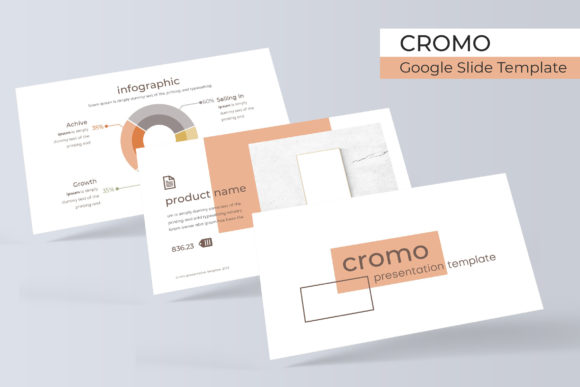
Evaluating the Cromo Google Slide Template for Professional Presentations
Finding a presentation template that balances aesthetic appeal with functional depth is often a challenge for professionals who need to communicate complex ideas quickly. The Cromo Google Slide Template distinguishes itself in this crowded market by offering a substantial volume of content without sacrificing design coherence. With 150 total slides distributed across five distinct premade color themes, this resource is engineered for users who require versatility and speed. Rather than providing a single static look, Cromo functions as a comprehensive visual system. Each of the five color variations includes 30 unique slides, ensuring that whether you are presenting financial data, creative portfolios, or educational content, the visual language remains consistent yet adaptable to specific branding needs.
Structural Depth and Content Variety
The primary value proposition of the Cromo Google Slide Template lies in its sheer volume of usable assets. Many templates offer high slide counts by duplicating layouts with minor tweaks, but Cromo appears to prioritize functional diversity. The inclusion of handcrafted infographics is particularly noteworthy for business professionals and marketers. These are not generic charts pulled from stock libraries; they are custom-designed vector graphics that integrate seamlessly with the master slides. This distinction matters because it allows for genuine editing rather than simple recoloring. When data visualization is built into the template’s DNA, updating quarterly reports or project timelines becomes a matter of adjusting values rather than rebuilding graphics from scratch.
Beyond standard content slides, the template addresses the often-overlooked structural elements of professional storytelling. Dedicated section break slides provide necessary visual pauses, helping audiences digest information during longer presentations. Similarly, the gallery and portfolio slides are designed with creatives and agencies in mind. These layouts understand the importance of negative space and image hierarchy, allowing photographs and case studies to take center stage without competing with heavy typographic elements. For freelancers and small business owners pitching services, these specific slide types can elevate a proposal from a basic document to a polished brand experience.
Technical Usability and Workflow Integration
A beautiful template is useless if it breaks when edited. Cromo demonstrates a strong understanding of technical usability through its reliance on Master Slides. This architecture ensures that global changes—such as updating a logo, changing a font family, or adjusting footer information—propagate instantly across all relevant slides. For teams collaborating on a deck or individuals managing multiple presentations, this feature saves hours of manual formatting. The graphic picture placeholders utilize a drag-and-drop functionality that respects aspect ratios and masking, preventing the distorted images that frequently plague amateur presentations.
The template’s compatibility extends beyond Google Slides. The package includes five PPTX files and five widescreen PPTX variants, acknowledging that many corporate environments still operate primarily within Microsoft PowerPoint. This cross-platform flexibility is essential for consultants and educators who may create a deck in one ecosystem but present in another. Furthermore, the illustrations are described as pixel-perfect, suggesting they were created at high resolutions or as vectors to prevent blurriness on large projection screens or high-DPI displays. This attention to technical detail indicates a product developed by designers who understand the friction points of real-world presentation workflows.
Customization and Brand Alignment
While the five premade colors provide an excellent starting point, the true test of a template is how easily it adapts to external brand guidelines. Cromo’s structure supports deep customization. Because the graphics are editable and resizable, users are not locked into the designer’s original composition. A marketing team can take a complex infographic intended for a landscape layout and reconfigure it for a different context without losing quality. The inclusion of free font download links in the Readme file further reduces friction, ensuring that typography renders correctly across different machines. This eliminates the common issue of missing fonts replacing carefully chosen typefaces with system defaults, which can ruin the visual integrity of a deck moments before a meeting.
Practical Applications and Audience Fit
Determining whether Cromo is the right tool depends largely on your specific role and output frequency. Entrepreneurs and startup founders will likely find the most immediate value in the pitch-ready layouts and data visualization tools. The ability to switch between five color schemes allows for rapid A/B testing of investor decks or tailoring the visual tone to match different potential partners. Educators and trainers benefit from the section breaks and infographic slides, which help structure dense instructional material into digestible segments. The clean, modern aesthetic avoids the cluttered look of academic templates while maintaining enough formality for classroom or workshop settings.
Creative professionals, including photographers, designers, and architects, should evaluate the portfolio and gallery slides specifically. These layouts serve as digital lookbooks where the work itself is the hero. However, these users must also be mindful of the licensing and asset limitations. Marketers and agency teams will appreciate the consistency of the master slides, which helps maintain brand uniformity across campaigns produced by different team members. For serious hobbyists or bloggers creating content for conferences or webinars, the template offers a level of polish that typically requires hiring a professional designer, making it a cost-effective solution for elevating personal branding.
Realistic Considerations and Limitations
Despite its strengths, prospective users must approach the Cromo Google Slide Template with realistic expectations. The most critical limitation, clearly stated in the documentation, is that photographs and pictures used in previews are not included. They are for illustration purposes only. This means the template provides the container, not the content. Users without access to high-quality stock photography or their own professional imagery may find the gallery slides look empty or unbalanced until populated with suitable visuals. Budgeting time and resources for image acquisition is a necessary step in utilizing this asset effectively.
Additionally, the sheer volume of 150 slides can be overwhelming for new users. There is a learning curve associated with navigating such a large library to find the specific layout needed. While the organization by color theme helps, users should expect to spend initial time auditing the master slides and understanding the grouping logic of the infographics. Those looking for a simple, ten-slide quick fix might find the depth of Cromo excessive. It is a tool designed for users willing to invest a small amount of setup time to gain long-term efficiency and quality. Finally, while the PPTX compatibility is robust, complex animations or transitions created natively in Google Slides may occasionally behave differently when exported to PowerPoint. Testing in the final presentation environment is always a recommended best practice.
Long-Term Value and Asset Management
When evaluating digital assets, longevity is as important as immediate utility. Cromo positions itself as a reusable resource rather than a disposable single-use template. The modular nature of the 30 slides per color theme allows users to mix and match layouts to create entirely new decks for future projects without repurchasing. The use of standard, free fonts ensures that files remain accessible years down the line, avoiding obsolescence caused by discontinued typefaces. For organizations building a library of approved presentation assets, Cromo offers a foundational system that can be expanded upon internally.
Ultimately, the effectiveness of the Cromo Google Slide Template hinges on the user's willingness to leverage its structural advantages. It is not merely a skin for slides but a productivity tool designed to streamline the creation of professional-grade presentations. By combining extensive content variety with technical reliability and cross-platform support, it addresses the core needs of adults aged 20–50 who view presentations as a critical component of their professional communication strategy. Whether for securing funding, teaching a concept, or showcasing creative work, Cromo provides a reliable framework that supports clarity, engagement, and brand consistency.