Winter Filled Line Icon Set: Integrating Seasonal Visuals into Professional Workflows
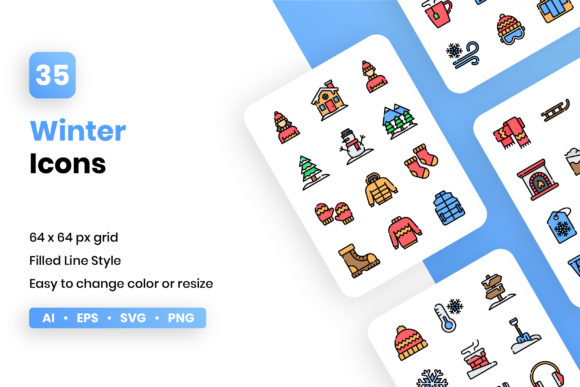
Seasonal design projects require a balance between thematic relevance and functional clarity. The Winter Filled Line Icon Set serves as a specialized asset library designed to bridge this gap for professionals managing end-of-year campaigns, educational materials, or seasonal product updates. Unlike generic icon packs that may lack stylistic cohesion, this collection offers 35 vector icons specifically curated for winter themes while maintaining a strict 64×64 px grid. This technical foundation ensures that whether you are designing a mobile app interface, a printed holiday newsletter, or a corporate presentation, the visual language remains consistent and scalable.
In professional workflows, assets must be more than just aesthetically pleasing; they must be operationally efficient. This set is structured to reduce friction during the design phase. By providing files in AI, EPS, individual SVG, and multiple PNG resolutions (64px, 128px, 256px, 512px), it accommodates various stages of production without requiring manual conversion or redrawing. Understanding how to leverage these specific file types within your existing ecosystem is key to maximizing the utility of the Winter icon set across digital and print mediums.
Strategic Asset Preparation and File Management
Before opening any design software, effective asset management dictates the success of a project. The inclusion of separate SVG files for each icon in this set allows for modular organization. Rather than importing a massive sprite sheet or a complex artboard containing all 35 icons, you can integrate only what is necessary into your component libraries. For web developers and UI designers, this separation is crucial for performance optimization and code cleanliness. You can store these SVGs in a dedicated asset repository or design system tool like Figma or Sketch, tagging them with metadata such as "winter," "seasonal," or "holiday" to ensure discoverability for future team members.
For print-focused workflows, the AI and EPS formats provide the necessary foundation for high-resolution output. When preparing for brochures, packaging, or large-format signage, starting with these master vector files prevents pixelation issues that often arise from upscaling raster images. A practical approach involves creating a localized resource folder at the start of a seasonal campaign. Populate this folder with the relevant AI or EPS files alongside your brand guidelines. This preparation step ensures that when deadlines tighten, the team is not searching through zip files but accessing ready-to-use vectors that align with the project’s technical specifications.
Implementation Across Digital Platforms
The 64×64 px grid basis of the Winter Filled Line Icon Set is particularly significant for digital interface design. In mobile app development and responsive web design, adherence to a standard grid ensures that icons align perfectly with text baselines, buttons, and navigation bars. The filled line style offers excellent legibility at smaller sizes, making these icons suitable for tab bars, feature lists, and notification badges. Because the icons are vector-based, they render crisply on high-density retina displays without increasing file size significantly, which is a critical factor for maintaining fast load times and smooth user experiences.
When implementing these assets in a live environment, consider the interaction between the icon style and your user interface. The "filled line" aesthetic combines the weight of solid shapes with the definition of outlines, creating a visual middle ground that works well in both light and dark modes. Developers can utilize the included SVG files to implement CSS-based color changes dynamically. This means you do not need to export new assets if your brand colors shift for a specific promotion; you simply adjust the fill and stroke properties via code. This flexibility streamlines the maintenance process and allows for rapid iteration during A/B testing of seasonal landing pages.
Adapting Assets for Print and Presentation Materials
While digital applications prioritize scalability and code efficiency, print and presentation workflows demand precision and editability. The AI and EPS files included in this set allow marketers and educators to customize the icons to match specific brand palettes or thematic nuances. For instance, if your corporate identity uses a specific shade of navy blue rather than traditional winter white, you can open the source vector file and adjust the global colors in seconds. This level of customization ensures that seasonal graphics feel like an integrated part of your brand identity rather than an afterthought.
For presentations and infographics, consistency is paramount. Mixing different icon styles can make a slide deck look unprofessional. Since all 35 icons in this set share the same stroke width, corner radius, and optical weight, you can combine them freely without visual dissonance. When building an infographic about winter safety tips or year-end financial reviews, use the 64px grid as a guide for spacing and alignment. Even if you scale the icons up to 256px or 512px for a projected slide, the proportional relationships remain intact. The pre-rendered PNG files serve as a quick backup for platforms that do not support vector editing, such as basic slide builders or internal communication tools, ensuring you always have a compatible format available.
Workflow Integration and Cross-Platform Compatibility
Integrating the Winter Filled Line Icon Set into a broader creative process requires understanding compatibility across different software environments. Designers working in Adobe Illustrator will find the AI files native and fully editable, allowing for path manipulation or combination with other vector elements. Those using Affinity Designer, CorelDRAW, or open-source tools like Inkscape can rely on the EPS or SVG formats for seamless import. This cross-platform versatility eliminates bottlenecks when collaborating with freelancers or agencies who may use different software stacks.
For content creators and bloggers who may not have advanced vector editing skills, the inclusion of high-resolution PNGs (up to 512px) provides immediate usability. These raster versions are optimized for transparency and clarity, making them drag-and-drop ready for WordPress, Canva, or social media schedulers. However, even non-designers should maintain access to the original vector files. If a marketing strategy pivots mid-campaign and requires a color update or a slight modification to an icon’s composition, having the source files prevents the need to purchase a new asset pack or hire a designer for minor tweaks. This long-term accessibility adds value beyond the initial seasonal use case.
Quality Control and Visual Consistency
Maintaining quality control when using seasonal assets involves verifying that the icons meet accessibility and readability standards. The filled line style generally offers better contrast than thin-line icons, but it is still essential to test the icons against various background colors. When using the SVG or PNG files, ensure there is sufficient padding around the icon within its container to prevent visual crowding. The 64×64 px grid provides a built-in safe zone; respecting this boundary during implementation helps maintain a clean, organized layout across all deliverables.
Consistency also extends to the semantic meaning of the icons. With 35 distinct symbols, it is important to establish internal guidelines for which icon represents which concept. For example, decide early whether the snowflake icon represents "cold weather," "winter sale," or "freezing conditions" within your specific context. Documenting these usage rules prevents mixed messaging, especially in large teams where multiple designers might be working on different touchpoints simultaneously. By treating the Winter icon set as a governed system rather than a loose collection of clip art, you elevate the professionalism of your seasonal communications.
Maximizing Long-Term Value and Efficiency
Although labeled as a winter-themed collection, the structural quality of this set allows for extended utility. The clean geometry and neutral styling mean that several icons can be repurposed for other contexts with minimal adjustment. A thermometer icon might transition from a winter weather alert to a healthcare temperature check; a gift box icon can move from a holiday sale to a loyalty reward program. By viewing these vectors as foundational building blocks, you extend their lifecycle beyond the December-to-February window.
Efficiency in creative workflows is ultimately about reducing repetitive tasks. Having a verified, high-quality set of 100% vector icons eliminates the time spent searching stock sites, tracing low-quality JPEGs, or fixing inconsistent anchor points. The ready-to-use nature of the Winter Filled Line Icon Set allows professionals to focus on strategy and messaging rather than asset repair. Whether you are finalizing a Q4 report, launching a festive app update, or printing educational handouts, the reliability of these files supports a smoother, more predictable production cycle. Investing time in properly integrating this set now pays dividends in speed and consistency for every seasonal project that follows.